
Back to Blogs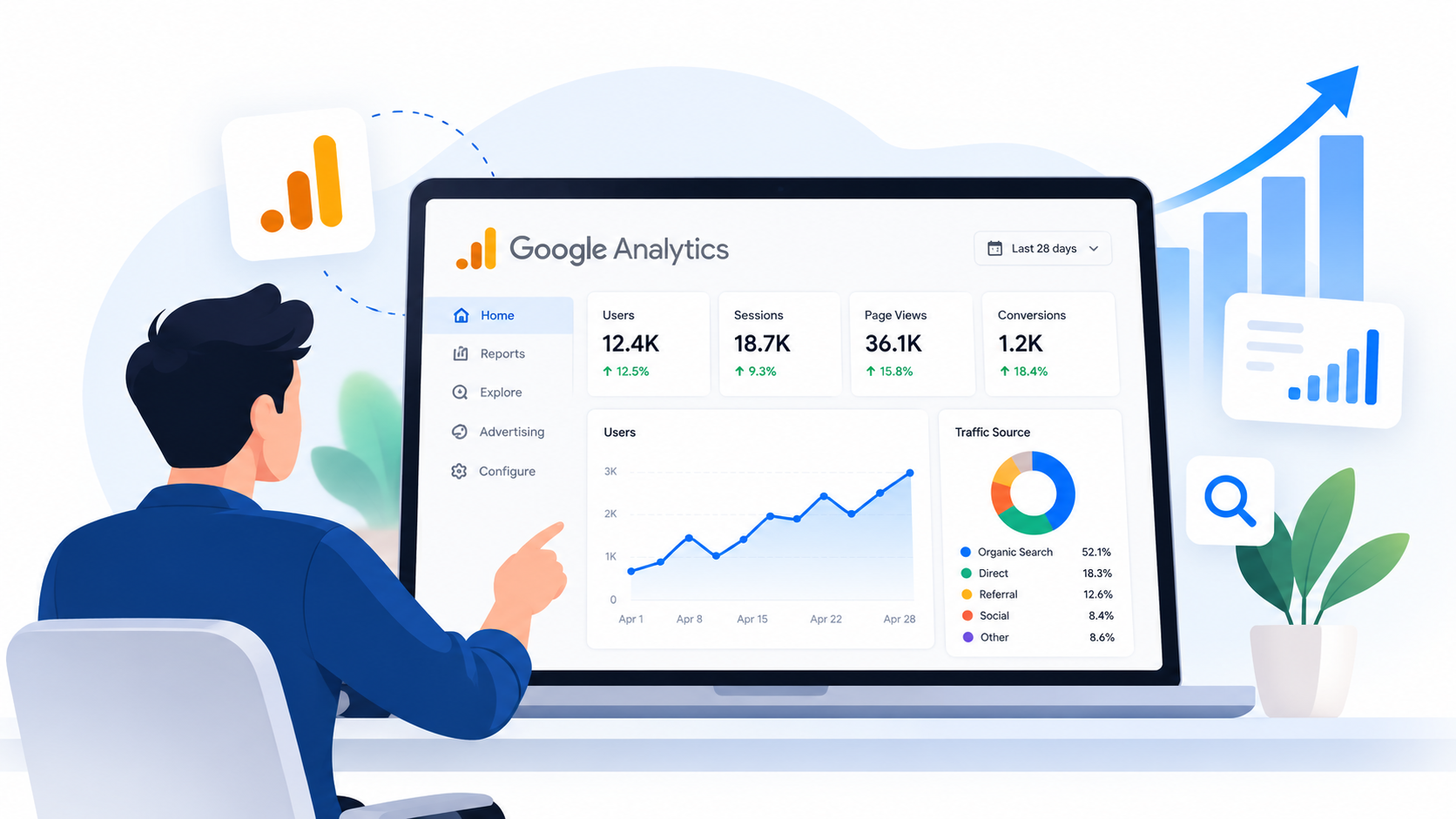
Email
A Beginner’s Guide to Google Analytics: How to Track and Improve Your Website’s Performance
A Beginner’s Guide to Google Analytics: How to Track and Improve Your Website’s Performance
Google Analytics for a website gives businesses data about visitors, traffic sources, page engagement, important actions, and other parts of the user journey. For beginners, however, the amount of available data can feel overwhelming.
Everyone in the business field consistently worries about their website's performance, sales, and traffic moving through the website or the app.
Google Analytics 4, commonly called GA4, makes it possible to monitor website activity through reports, events, acquisition data, engagement metrics, and key events.
What Is Google Analytics?
Google Analytics is a measurement platform that collects information about how people interact with a website and presents that information through reports.
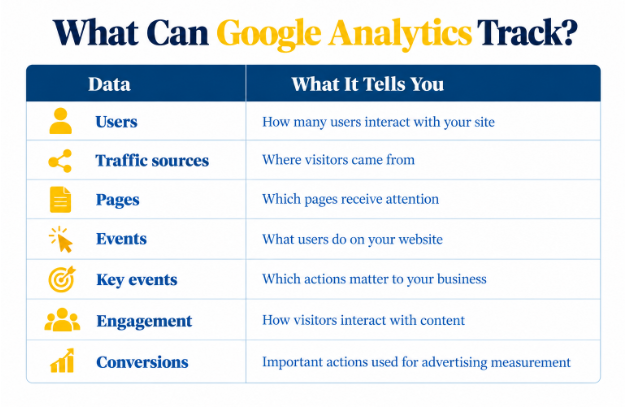
Businesses can use it to understand:
Where visitors come from
Which content they prefer
How they engage
Which important actions they complete
What Is Google Analytics For A Website?
Google Analytics tracks website traffic, user behavior, conversions, and performance to help you make data-driven improvements.
It is a free app and can be utilized by anyone with an account for website performance analysis.
This is an advanced tool that provides in-depth analysis in no time, such as:
Real-time website activity
Engagement rate
User behavior
Traffic sources
Conversion tracking
Audience demographics
User acquisition
Page views
Events and interactions
Bounce and exit rates
Device and technology data
Revenue and e-commerce performance
Difference Between Google Analytics and Google Search Console
| Feature | Google Analytics | Google Search Console |
|---|---|---|
| Main Purpose | Tracks website visitors and behavior | Tracks Google Search performance |
| Traffic | Shows how visitors interact with your site | Shows clicks & impressions from Google |
| Keywords | Limited keyword data | Shows search queries and keywords |
| User Behavior | Tracks engagement, events, & key actions | Focuses mainly on search activity |
| Best For | Improving website performance | Improving SEO and search visibility |
Why Should You Use Google Analytics for a Website?
Businesses can use Google Analytics for a website to:
Understand website traffic
Identify traffic sources
Find high-performing pages
Discover user behavior
Measure marketing campaigns
Identify potential conversion problems
Track leads and purchases
Make data-informed website improvements
For example, a page may attract many visitors but generate very few enquiries. That does not automatically mean the page is unsuccessful. It signals that the business should investigate factors such as search intent, page relevance, calls to action, or the contact process.
This is where analytics becomes useful for broader digital marketing services. Data can help teams decide which pages need better content, stronger CTAs, or improved navigation.
How to Set Up Google Analytics for a Website
The basic GA4 setup involves creating a property, adding a web data stream, and connecting the Google tag to your website.
1. Create or Sign In to Your Google Analytics Account
Sign in with your Google account and open Google Analytics. If you do not already have an Analytics account, create one before setting up the property.
Do not confuse an analytics account with an activity account.
My Google Activity lets you review and manage activity saved to your Google Account, including searches and other interactions across Google services.
It is separate from your Google Analytics website data.
2. Create a GA4 Property
Create a Google Analytics 4 property for the website you want to measure. A property is the Analytics container where your website's measurement data is collected.
3. Create a Web Data Stream
Choose Web as the platform and enter your website URL. Google Analytics provides a Measurement ID for the web stream.
4. Add the Google Tag to Your Website
The Measurement ID connects your website's data with its GA4 web data stream. Google's current documentation states that the Measurement ID begins with G- or AW-.
You can implement the Google tag through:
A CMS or website builder's native integration
Google Tag Manager
Manual developer implementation
Custom HTML where required
Common platforms with Analytics-related setup options include WordPress, Shopify, Wix, Squarespace, HubSpot, WooCommerce, and others.
If your website uses a platform without a suitable integration, a developer may need to add the Google tag manually.
5. Check That Data Is Being Received
Open the Realtime report after implementation. Google states that data can begin appearing in Realtime after collection starts, although processing and reporting can vary.
How Do I Check Google Analytics on My Website?
To answer how do I check Google Analytics on my website, sign in to Google Analytics, select your property, and open Reports.
Where to Find Your Website's Analytics Data
1. Sign in to Google Analytics.
2. Select the relevant property.
3. Open Reports.
4. Use Realtime for current activity.
5. Explore acquisition reports for traffic sources.
6. Review engagement reports for page and interaction data.
7. Review key events for important business actions.
What Should Beginners Look at First?
Do not start by opening every available report. Begin with:
Users and sessions
Traffic acquisition
Landing or content pages
Engagement
Key events
Leads, sign-ups, or purchases
A focused dashboard makes it easier to identify meaningful changes.
How to Track Website Performance with Google Analytics
To track website performance with Google Analytics, monitor traffic acquisition, engagement, important user actions, and business outcomes over a consistent time period. Then compare the data against your website goals to identify what is working and what needs improvement.
1. Track Website Traffic
Start with:
Users: People who interact with the website.
Sessions: Visits or periods of activity on the website.
Traffic trends: Changes in website activity over time.
New vs. returning users: Helps provide context about audience behavior.
2. Analyze Where Your Visitors Come From
Review channels such as:
Organic search
Direct traffic
Referral traffic
Paid campaigns
Social
This is a core part of Google Analytics website traffic analysis because traffic volume alone does not explain which marketing activities are producing useful visitors.
3. Identify Your Most-Visited Pages
Review:
Landing pages
Blog posts
Service pages
Product pages
Contact pages
High traffic can reveal topics or offers that attract attention.
A digital marketing agency can also compare these pages with search and campaign data to identify content opportunities.
4. Measure Engagement
GA4 includes engagement-related measurements such as:
Average engagement time
Bounce rate
Engagement rate
5. Track Important User Actions
Track actions that indicate genuine interest.
Form submissions
Buttonclicks
Downloads
Important navigation events
6. Measure Leads, Sign-Ups, and Purchases
Examples include:
Contact form submissions
Quote requests
Phone/contact interactions
Newsletter registrations
Account registrations
Purchases
Appointment requests
Google Analytics Website Traffic Analysis: What Should You Look For?
Traffic Volume
Ask:
Is traffic increasing or decreasing?
Which periods perform best?
Are there unusual spikes?
Did a campaign, ranking change, or technical issue affect traffic?
Traffic Sources
Ask:
Is organic search producing visitors?
Are paid campaigns generating traffic?
Are referrals contributing meaningful visits?
Which channels produce business results?
Landing Pages
Identify:
Pages attracting visitors
Pages generating engagement
Pages generating key events
Audience and Device Insights
Compare:
Mobile vs. desktop
Geographic trends
New vs. returning users
These comparisons can reveal problems that are hidden in overall averages.
7 Important Google Analytics Metrics Beginners Should Understand
1. Users
Users indicate how many people interact with your website. Use this metric to understand audience size and traffic trends.
2. Sessions
A session represents a period of user activity on your website. Sessions provide context around visits and traffic patterns.
3. Views
Views show how often pages or screens are viewed. Comparing views with users can help identify frequently consumed content.
4. Engagement Metrics
Engagement data helps you understand whether visitors meaningfully interact with your website rather than simply arriving and leaving.
5. Event Count
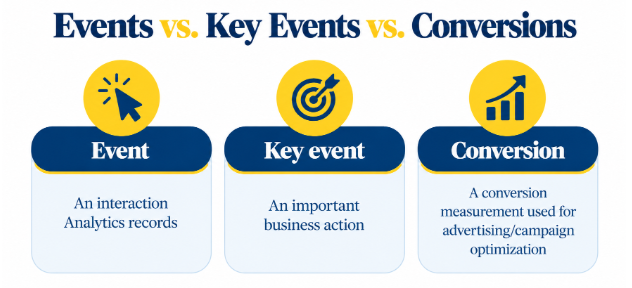
An event records a specific interaction or occurrence, such as a page load, click, or purchase.
6. Key Events
A key event is an event that represents an action particularly important to a business.
Google's documentation specifically gives lead-form submissions as an example of an action that can be measured as a key event.
Google currently distinguishes key events from conversions: key events help measure important business actions in Analytics, while conversions are used for advertising measurement and optimization.
7. Traffic Acquisition
Traffic acquisition shows how users arrive at your website. It helps identify channels such as search engines, direct visits, referrals, and campaigns.
How to Use Google Analytics to Improve Website Performance
1. Find Pages That Attract Traffic but Generate Few Results
A high-traffic page with few business outcomes deserves investigation.
Check:
Calls to action
Page relevance
User intent
Forms
Internal linking
Content quality
For example, adding relevant internal navigation can help users discover another useful service or resource.
2. Find High-Performing Pages and Replicate What Works
Analyze patterns across:
Topics
Landing pages
CTAs
Traffic sources
Content formats
If several pages perform well because they answer a specific search intent clearly, use those insights when planning future content.
3. Identify Underperforming Traffic Sources
A channel can deliver visitors without delivering meaningful results. Compare traffic sources against engagement and key events instead of judging channels only by volume.
Learn how to schedule social media posts to maintain consistent publishing, reach your audience at the right time, and support better traffic results.
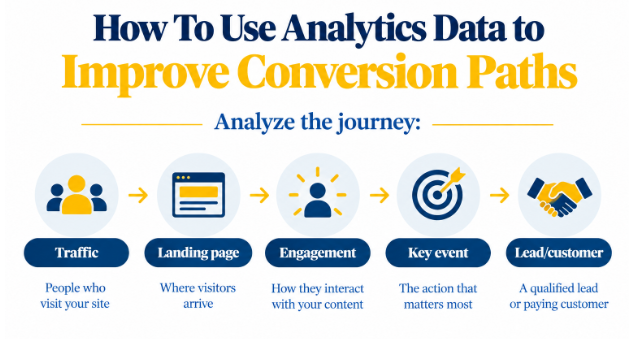
4. Use Analytics Data to Improve Conversion Paths
A conversion path shows the steps a visitor takes from arriving on your website to completing an important action, such as submitting a form or making a purchase.
This makes it easier to identify where users stop progressing.
5. Combine Analytics With Other SEO and Marketing Data
Combine Analytics insights with:
SEO
Google Search Console
PPC
Content marketing
Conversion rate optimization
Technical SEO
For instance, Search Console data can help explain search visibility, while Analytics can show what visitors do after entering the site.
Analyzing your ads click-through rate can add another useful layer when evaluating search performance.
How to Track Leads With Google Analytics
A lead-generation business might track:
Contact form submissions
Quote requests
Consultation requests
Calls
Sign-ups
WhatsApp/contact interactions where technically measurable
Qualified leads
The exact implementation depends on how each action occurs on the website and whether the required event tracking is configured correctly.
Common Google Analytics Mistakes Beginners Should Avoid
Installing analytics but never checking the data
Tracking traffic instead of business outcomes
Creating too many events
Not setting up important key events
Comparing unrelated time periods
Making decisions from very small data sets
Ignoring tracking errors
Expecting analytics to explain everything
Analytics is a measurement system, not a complete explanation of why users behave in a certain way. Combine quantitative data with user research, SEO data, customer feedback, and website testing where appropriate.
Google Analytics Beginner Guide: A Simple Weekly Routine
Check overall traffic trends.
Review acquisition channels.
Identify top landing/content pages.
Look for unusual traffic changes.
Review important events.
Check leads, sign-ups, or purchases.
Compare performance with previous periods.
Identify one improvement to test.
This simple routine is often more useful than spending hours reviewing every available metric.
Businesses can also connect Analytics findings with GMB SEO and other local marketing data when local search visibility is important.
Google Analytics for Different Types of Websites
Google Analytics for Business Websites
Track:
Leads
Contact forms
Calls
Service-page performance
These measurements can show whether website visitors are moving toward meaningful business actions.
For businesses that need help connecting analytics, SEO, content, and digital growth activities, functions of marketing can be viewed as connected rather than isolated tasks.
Google Analytics for E-commerce Websites
Track:
Product views
Add-to-cart behavior
Checkout
Purchases
Revenue
E-commerce businesses should connect product and purchase data so traffic can be evaluated alongside commercial results.
Google Analytics for Blogs
Track:
Content traffic
Landing pages
Search-driven visitors
Engagement
Internal navigation
This can help content teams identify topics that attract and retain relevant readers.
Final Takeaways
Google Analytics becomes easier to use when you focus on business questions rather than every available metric. Start with traffic, acquisition, engagement, important events, and outcomes.
The most useful Google Analytics beginner guide principle is simple:
Collect reliable data
Understand what it means
Compare it over time
Use the findings to test practical website improvements.
A website should attract the right visitors, give them useful information, and make important actions easy to complete.
If you want professional help turning website data into a clearer digital growth strategy, contact us to discuss your requirements.
FAQs
Common Questions
Focus on users, sessions, traffic sources, engagement, important events, landing pages, and leads or purchases to understand website performance.
Yes. Google Analytics can track website visitors, their traffic sources, pages viewed, engagement, events, and other interactions when tracking is configured correctly.
Yes. You can track leads through events and key events, including form submissions, quote requests, sign-ups, and other important actions.
Check Google Analytics weekly to review traffic, acquisition, engagement, and key events. More frequent checks may help during active campaigns or major changes.
No data may indicate an installation or configuration issue. Check your Google tag, Measurement ID, property, data stream, and Realtime report.
GA4 retains user-level and event-level data for a set period based on your property's retention settings. Standard reporting may have different retention rules.